

M2’s purpose has always been simple: to support great teachers in the work they do every day. Since then, we’ve seen the same pattern in classrooms across the country: teachers are resourceful, dedicated, and creative. What they’re often missing is time. With so much to do, understanding which instructional moves are aligned with the research is something that can quickly fall by the wayside.
Administrators see it too. They know strong instruction depends on consistent structure and rigor. But most teachers don’t have a coach in the room to encourage the use of the most effective strategies. Many are teaching new subjects or grade levels with less training than they’d like. This is where the M2’s latest feature can help.
Introducing Whole Group Guides
Whole Group Guides let teachers launch structured, interactive learning activities for the entire class without any student devices or setup time required.
With a few taps, and a chance to share the day’s objective, M2 gets to work. Whole Group Guides include clear verbal directions that lead students through a learning experience aligned with both the lesson of the day and sound pedagogy. As M2 shares directions out loud, the teacher stays in full control, advancing the activity with just a quick tap.
Here’s how a Whole Group Guide might look in an elementary Math class:
The teacher walks up to M2 and taps to request a Guide. She says, “I want my students to practice adding fractions with unlike denominators.” That’s the only prep required.
Seconds later, M2’s voice grabs student attention by introducing the activity. Today, we’ll practice adding fractions by finding the least common denominator. You’ll need a pencil and paper. Let’s get started!

From there, M2 guides students through a few questions and problems aligned with the objective. Today, M2 notices that students can benefit from interleaving, or mixing several problem types together to build flexible thinking.
After each step, students turn to a partner to discuss their thinking. The teacher is free to walk the room, checking in with students, coaching, answering questions, or pulling students aside who need some extra help.
When the Guide ends, the teacher smoothly transitions back to the front and decides to review one problem that sparked extra discussion.
What makes Whole Group Guides different?
- No participant setup. Every student is included without extra steps.
- Teacher-controlled pace. M2 provides the directions, but teachers shape the timing.
- Designed for real classrooms. Activities include individual work, turn-and-talks, and whole-class moments to keep everyone engaged.
- More access to the teacher. With M2 managing the flow, teachers can spend more time giving feedback instead of handling logistics.
For administrators seeking stronger instructional consistency across classrooms, Whole Group Guides model well-structured learning in real time. Teachers participate in the experience alongside their students, gaining a feel for the strategy as it unfolds.
Three forms of Whole Group Guides: Practice, projects, and something new
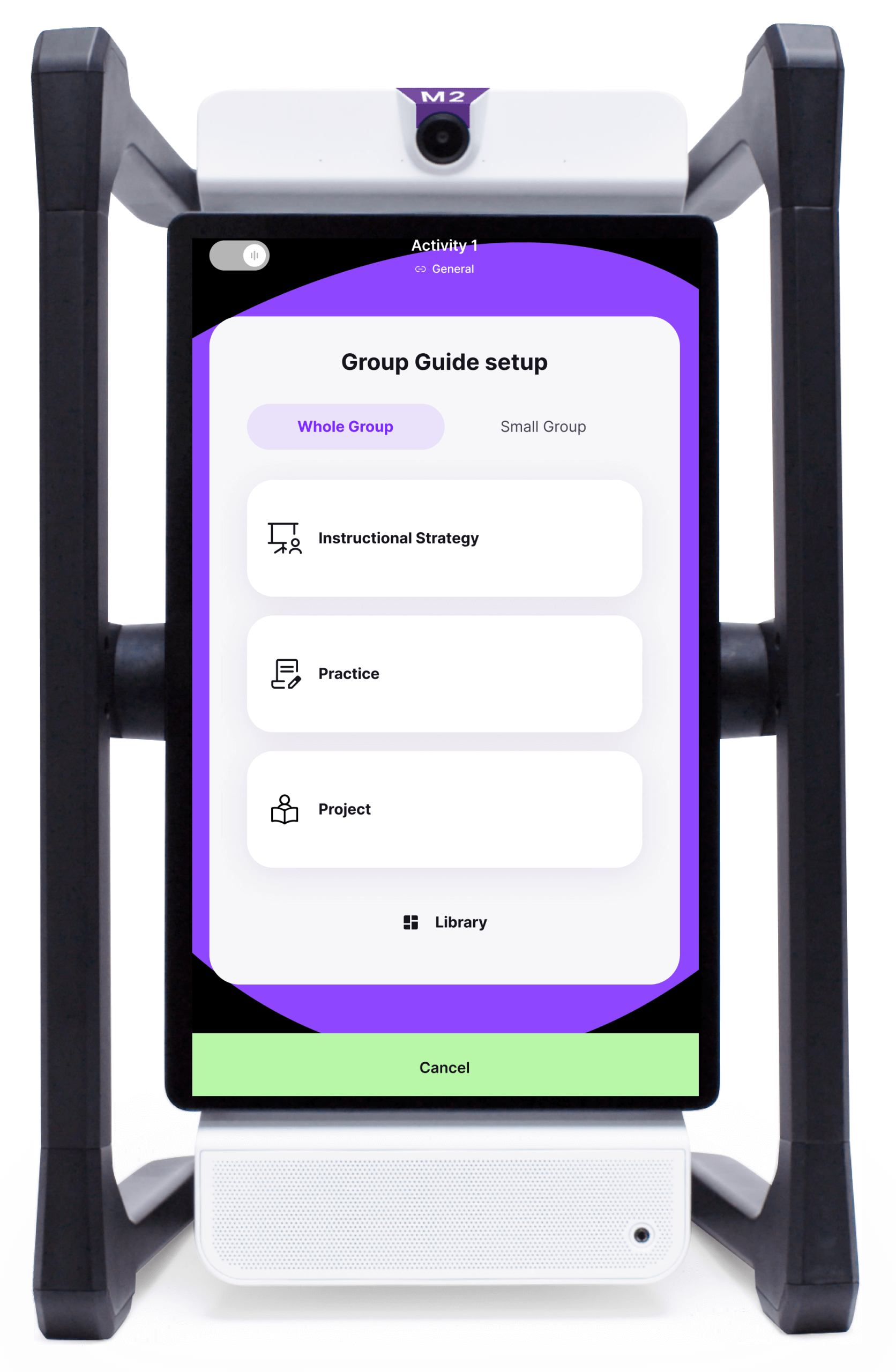
Practice Guides
Students work individually through repetitions of a skill, often pausing to check thinking with a partner or discuss as a class. Useful for reinforcing learning without relying on worksheets.
Project Guides
Collaborative activities where the entire class moves into small groups at once — helpful for hands-on work, labs, shared problem-solving, or building something together. And then there’s the newest option:
Instructional Strategies: research-backed teaching, available in the moment
We heard the same theme from teachers and administrators again and again: they value strategies like Retrieval Practice or Elaboration, but during a lesson, it can be hard to launch them with clear steps and language. Instructional Strategies help with that challenge. When teachers select Instructional Strategy, M2 looks at the lesson objective and materials, then generates a Whole Group Guide built around a proven learning approach. These strategies draw from the work of researchers like Robert Marzano, John Hattie, and decades of cognitive science:
- Retrieval Practice to strengthen memory
- Elaboration to deepen understanding
- Dual Coding to connect visuals and ideas
- Concrete → Abstract to build conceptual thinking
- Interleaving to support flexible problem solving
M2 provides the structure and directions. The teacher brings the expertise, judgment, and support that only a person can provide. For administrators, this means teachers at all levels of experience can model strong instructional practices throughout a lesson. For teachers, it feels like having a prepared partner who can help launch a strategy right when the moment calls for it.
A sustainable way to make every lesson great
Whole Group Guides give teachers more freedom to focus on students. By removing setup, simplifying structure, and offering research-backed steps in real time, M2 helps teachers stay present with their students: circulating, giving feedback, listening in on conversations, pulling small groups, and offering the kinds of support no device can replace. It’s a vision of the classroom where great teaching becomes achievable across the school day because the scaffolding is already built into the experience.
Talk with us: Let’s discuss how M2 can support your goals and explore options to demo, pilot, or purchase.
See it in action: Join one of our upcoming 15-minute webinars to experience M2 firsthand and hear stories from educators already co-teaching with it.
Share your story: We want your voice in the conversation. What makes differentiation sustainable in your school? How are you moving beyond screen dependence? Share your insights with us at community@swivl.com.