
School and district leaders constantly balance the big picture with on the ground details.
Across the organization, it’s important to get everyone working towards higher quality instruction, and to provide feedback and support that actually reflects that vision.
At the same time, you have a list of specific projects and cohorts that need extra attention: early career teachers, a curriculum investment, or a school that needs special support. These groups require customized feedback to match those goals, without forgetting the org-level priorities.
That is exactly what M2’s Sites within a Team can do.
Three levels that match how districts already work
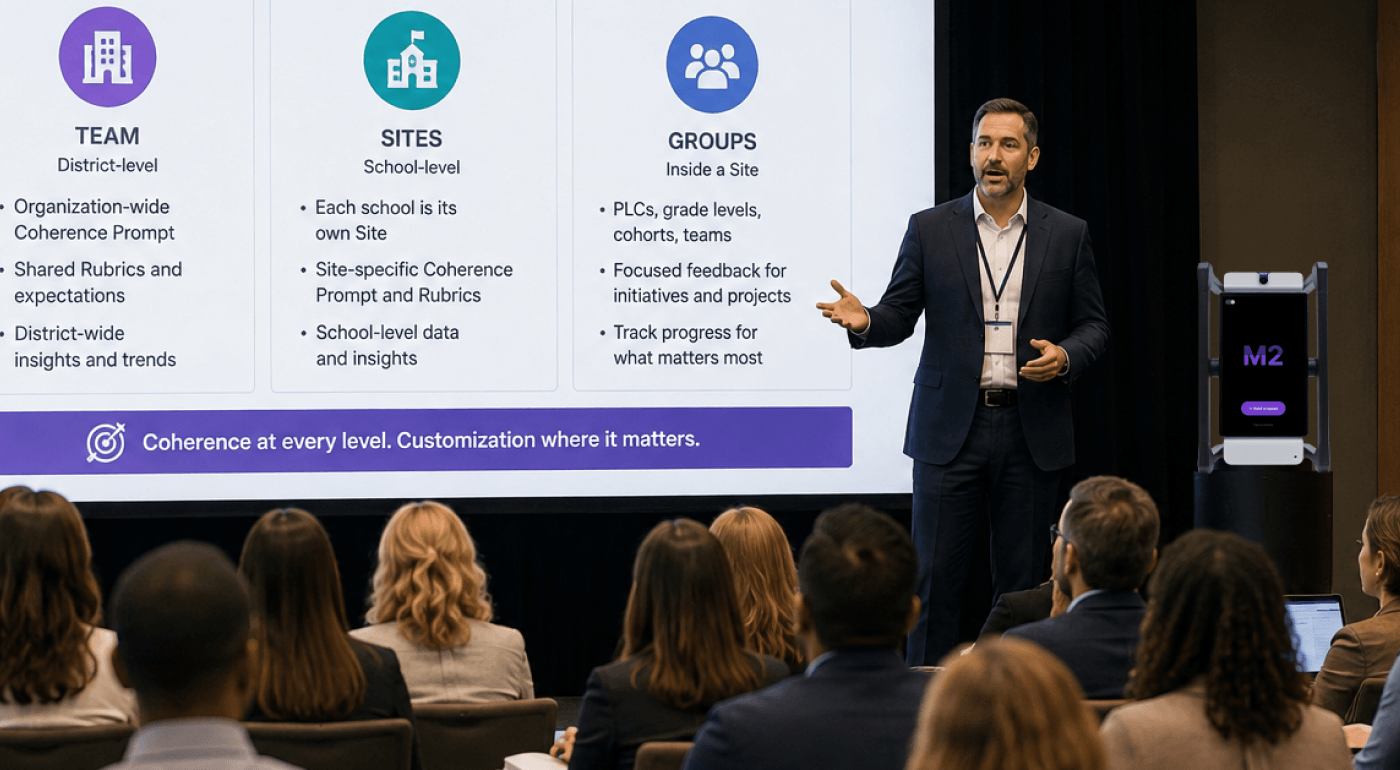
An M2 account is organized in three levels.
The Team is your district. It holds organization-wide expectations: the Coherence Prompt and the Rubrics that describe what good teaching looks like everywhere.
A Site is a school. Every school in the district is its own Site inside the Team, with its own Coherence Prompt, its own custom Rubrics, and its own view of the data.
Groups live inside a Site and organize the work that happens below the building level: PLCs, grade levels, new teacher cohorts, curriculum implementations, leadership teams.
The same structure applies whether you have sixty schools or one. That consistency is what lets a district track progress, helps a principal see their own staff, and allows a coach to look at a single cohort.
Support org-level goals and offer customized support
Administrators deploy feedback Coherence Prompts and scoring Rubrics at two levels: Team and Site.
At the Team level, district leaders set the defaults. Everyone in the district works within that context. Teachers get more frequent, criteria-aligned feedback to improve their practice. Leaders get a consistent picture of how instruction is changing over time, across every building.
At the Site level, a school adds what matters in that building. The teachers there still belong to the district Team, and the feedback and rubrics from both levels work together to support their practice. For example, a district-wide focus on student discourse stays in place, while a middle school in its second year of a new literacy curriculum can add look-fors tied to that program.
With this setup, everyone gets targeted, more frequent feedback, while the schools with distinct needs get scoring and feedback to match their goals.
Groups hold the projects inside a school
Lots of work does not happen at the level of a whole building. It happens in a first-year teacher cohort, a fourth-grade team, or a department piloting new materials. Groups are how those cohorts live inside a school Site.
Each Group is created with a group type, which is how you segment the work in a building and later look at data for that segment. M2 includes six predefined types:
- Classroom
- Evaluation
- PLC
- Staff Meeting
- Training
- One-on-Ones
Additional group types are coming, so accounts will be able to define their own labels for things like a beginning teacher program or a building leadership team.
This is also how a district initiative that spans multiple schools works. An induction program or a curriculum pilot running in five buildings becomes a Group with members in any of those Sites. The shared expectations for that initiative can sit at the Team level, so every participating teacher hears the same thing, while each school’s Site prompt and rubrics keep the feedback grounded in that building.
Start with the work you’re already doing
You do not need a complete map of every school, cohort, and PLC before anyone benefits from M2 in your organization.
Set up the district Team, create Sites for the schools that are participating now, and build your first Groups around the work already underway. Identify the teachers you are giving the most support to, or the initiative taking up the most attention this year, and start there.
The rest of the district, whether that includes administrators, school-level leaders, or teachers, can keep working with M2 at the Team and Site levels. They still get feedback and scoring aligned to the organization’s high-level goals.
Coaches can work across Sites
Instructional coaches often do not belong to a single building. A coach supporting several schools can work across multiple Sites, which adds flexibility to your setup.
The teachers most closely tied to a building stay on that building’s Site. The coach does not have to be limited to one of them. They can move across the Sites they support, while the teachers in each Site still receive the prompt, rubrics, and data that belong to their school.
Coherence and Customization
When a district uses this structure, there are two important benefits.
Teachers across the organization get more frequent feedback than walk-throughs and formal observations ever can provide, and all of it is aligned to the district’s values. That is the promise of M2’s rubric scoring and Coherence Prompt: frequent, consistent, criteria-aligned support at scale.
Additionally, the schools and cohorts that need something more specific can also get that support every time they turn on M2. New teachers hear from M2 in language that matches their induction program. A PLC works on the practices they are trying to build together. A school gets data that reflects their teachers and their goals, not an average of the whole district.
Leaders do not have to choose between coherence and customization. M2 delivers both.