

Useful feedback begins with evidence and the expertise to interpret it. The latest M2 web release brings those together, giving Leaders and Coaches the ability to edit rubric scores, refine written feedback, and certify Reports to calibrate rubrics for their Team or Site.
These updates help educators receive feedback that reflects both what happened during a session and the expectations guiding their professional growth.
Bring your judgment into the feedback
A rubric provides a shared framework, but applying it takes professional judgment. Leaders and Coaches bring knowledge of instructional practice, local priorities, and what each performance level looks like in context.
Now, you can bring that perspective directly into a finished Feedback Report. Review the Report alongside the transcript or video, then:
- Adjust rubric scores within the rubric’s existing levels.
- Edit written feedback to clarify an observation, add context, or explain a score.
- Restore the original AI Report if you want to start again.
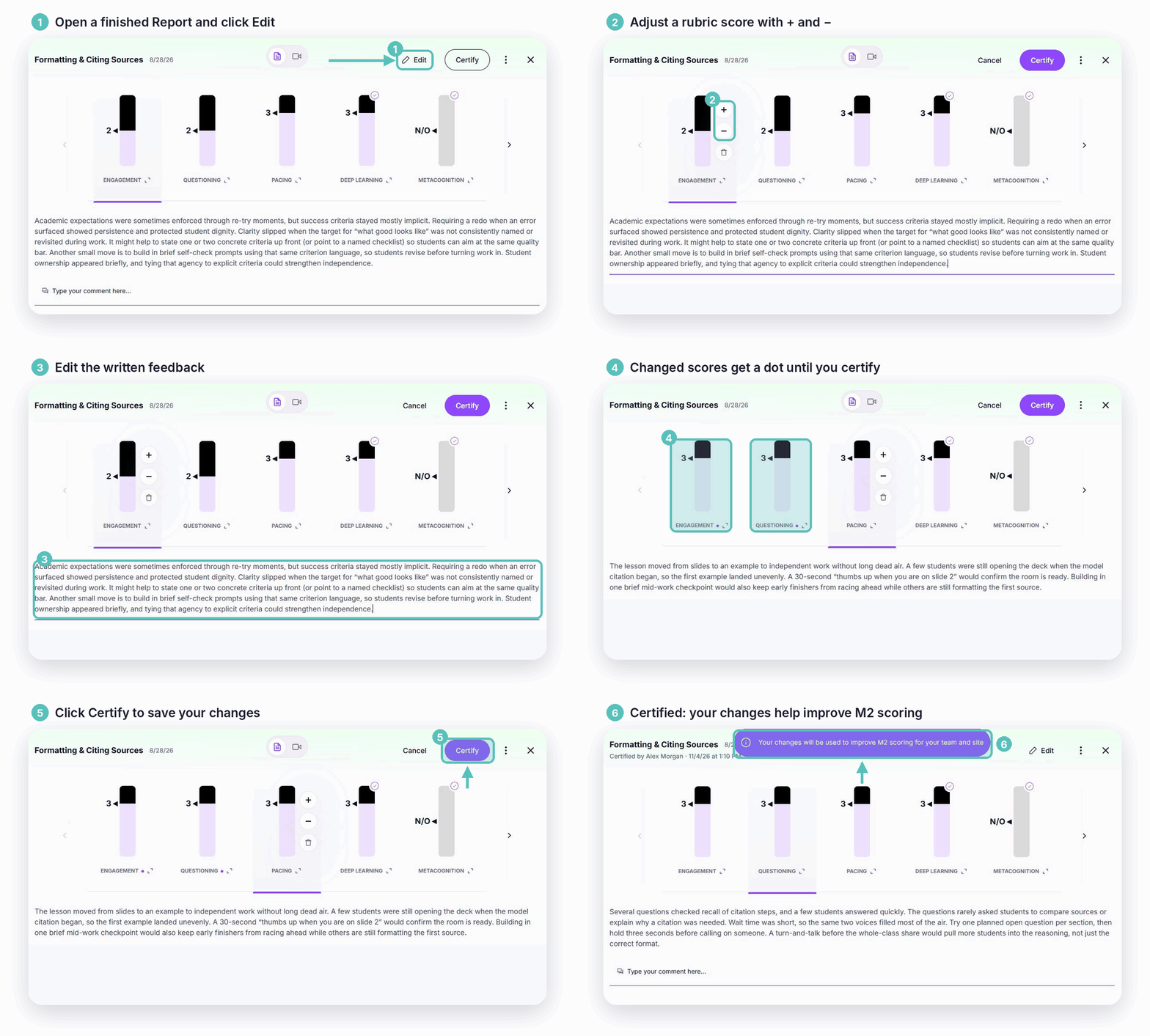
Scores and written feedback are edited separately, so changing a score does not automatically rewrite its explanation. Talk time, question counts, and other automatically generated metrics remain unchanged.
This gives Leaders and Coaches a practical way to make feedback more specific and useful before using it in a coaching or evaluation conversation.
Keep everyone working from the same Report
Once you save your edits, that version becomes the Report educators and other viewers see after the Report is shared. Your changes carry through to shared links, downloads, Report averages, and Admin Insights.
M2 retains the original AI scores and feedback so you can restore them when editing. If multiple eligible people edit the same Report, the latest save becomes the current version.
The result is a shared reference for the conversation, with the evidence, scores, and feedback together in one place.
Certify Reports to calibrate your rubrics
Editing immediately improves the Report in front of you. Certification helps M2 learn how your Team or Site applies a rubric to future Reports.
After reviewing a Feedback Report and making any needed adjustments, certify it to count toward calibration. Once a rubric has been certified 10 times, that rubric is marked as calibrated.
Those certified Reports provide examples of your team’s scoring expectations. M2 uses them to score future Reports on that rubric more consistently with the judgment of your Leaders and Coaches.
This matters because a shared rubric is only part of a shared standard. Teams also need consistency in how a rubric’s criteria are interpreted and applied. Certification brings that interpretation into M2 through Reports your team has reviewed and approved.
Built for your review process
Report editing is available on the web. Within a Group, Leaders and Coaches who manage that Group can edit its Reports. Through a Share Activity link, Leaders in the same organization and Coaches on the same Site can also edit without joining the Group. View-only copy links remain view-only.
Whether you support classroom teachers, faculty, or teacher candidates, these tools give your reviewers a way to connect their expertise to the feedback educators receive.
Your professional judgment shapes what comes next
Every reviewed Report is an opportunity to clarify expectations and support a more useful conversation about instructional practice.
With editing, you can refine the feedback an educator receives today. With certification and calibration, you can help M2 apply your rubric more consistently in future Reports.